
Data Access Control
Data access control decides what a person or agent can see, and enforces it at compile time - before any query reaches your warehouse. Personas, scopes, and policies resolve an allowed semantic subgraph during query planning; a request outside that subgraph fails to compile, so the data is never read. This page covers the policy types and how to define them.
Each datasource carries a restrictedAccess flag. That datasource-level switch is what tells Colrows to build the access index and enforce table, column, and row rules on every query. On an unrestricted datasource (restrictedAccess: false), access checks and row predicates are skipped entirely, so any policy you define here has no effect until the datasource is restricted. The flag is off unless you set it: the Restricted Access switch starts off when you add a datasource, and the datasource create API treats an omitted restrictedAccess field as false. Turn it on per datasource in Administration → Connections, or send restrictedAccess: true on the datasource API.
Where BI-layer filters fall short
Traditional architectures mask data after the query runs. The warehouse reads the full row. The BI tool applies the masking view. The audit log records that the raw data was retrieved. This is the confused-deputy problem: the warehouse has no idea who the real user is. It only knows the service account that connected. Any agent or SQL client that bypasses the BI tool sees all rows. The masking layer is optional, not structural.
Colrows takes the opposite approach. Policy is part of the semantic graph. During query planning, the requester's persona resolves an allowed subgraph. Compilation occurs entirely within it. If a metric depends on a node outside that subgraph, resolution fails. There is no query to run.
Compile-time, not after-the-fact
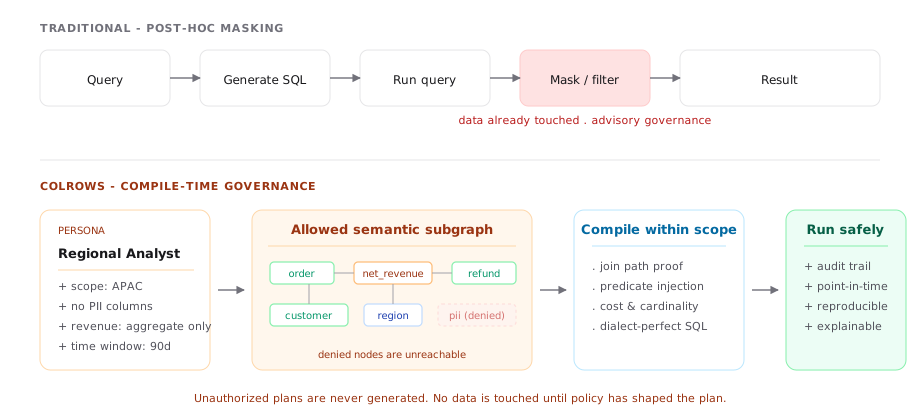
In a traditional architecture, a query runs against the raw schema and a row-mask or column-redaction layer trims the result. The data is already touched, the audit trail begins after the fact, and the controls are only as good as the masking layer's coverage. Colrows takes a different approach: policy is part of the graph. During semantic binding, the requester's persona resolves an allowed subgraph; compilation occurs entirely within it. If a metric depends on a node outside that subgraph, resolution fails. There is no query to run.
How Colrows differs
| Dimension | BI-Layer Filters | Colrows Compile-Time |
|---|---|---|
| Execution point | Runtime (post-read) | Compile time (pre-query) |
| Auditability | Weak; log-dependent | Deterministic; full trace |
| SQL performance | High latency (filter after) | Optimized (predicate pushdown) |
| Agent ready | No (bypassed by direct query) | Yes (all query paths) |
The pieces
| Object | What it does |
|---|---|
| Persona | A first-class graph node representing a role. Holds policy bindings and scope. |
| Scope | The slice of the graph a request is allowed to traverse - global / datastore / persona / user. |
| Data access policy | A named policy bound to one datasource and schema. It holds a set of rules and the users and groups (its subjects) it applies to. |
| Rule | The smallest unit within a policy. Each rule has its own ruleType (TABLE or PATTERN), an effect (ALLOW or DENY), a resource selector for tables and columns, and optional row conditions and attribute conditions. |
| Authorization attribute | A typed value on a user (a subject attribute) or on a table or column (a resource attribute). Attribute conditions in rules compare these values. This is the ABAC layer. |
| Data masking policy | A separate policy type that masks a column's values (FULL, KEEP_PREFIX, KEEP_SUFFIX) for specified users or groups. A mask does not grant access, and an access grant does not cancel a mask. See Data Masking Policies. |
Policy structure
A data access policy has these fields. The API rejects unknown fields, so a misspelled constraint fails instead of being ignored.
| Field | Definition |
|---|---|
name | Required. Unique in your organization. |
description | Optional free text. |
scope | Required. datasourceId and schema are both required. catalog is reserved and rejected; use a datasource that identifies the required catalog. |
subjects | Required. userIds and groupIds arrays. Users and groups are identified by their IDs. Directory group references keep their ad: format. Both arrays can be empty when the policy selects subjects through attributes (see below). |
rules | Required. At least one rule. |
policyId | Required on update. Generated on create. |
There is no policy-level type. A policy can mix table rules and pattern rules. Responses also carry lifecycle fields: active, revision, createdBy, createdAt, updatedBy, updatedAt, and orgId. Each update or delete increases revision and records the actor. Delete deactivates the policy.
Table rules
A table rule names one exact table with tableName. Narrow its columns with includedColumns and excludedColumns. An absent inclusion set selects all columns; an empty inclusion set selects none; exclusions are then removed from the selected set. The table and every named column must exist in the datasource layout.
rowConditions are SQL boolean expressions, validated when the policy is saved. Use unqualified column names. Subqueries and bind parameters are not supported. The conditions within one rule combine with AND.
{
  "ruleType": "TABLE",
  "effect": "ALLOW",
  "resourceSelector": {
    "tableName": "orders",
    "excludedColumns": ["email", "phone"]
  },
  "rowConditions": ["region = 'US'"]
}
Pattern rules
A pattern rule selects every table whose name matches tablePattern, which suits catalogs whose object lists change often. Narrow columns with includedColumnPatterns and excludedColumnPatterns. Patterns are Java regular expressions with case-insensitive substring matching, so use anchors when the entire name must match. Pattern rules do not support rowConditions or a row filter, because the table list isn't fixed. They do support an attribute condition.
{
  "ruleType": "PATTERN",
  "effect": "DENY",
  "resourceSelector": { "tablePattern": "^payroll_.*$" }
}
How rules combine
- Default deny. Without an applicable
ALLOWrule, access is denied. - Deny wins. An unconditional
DENYoverrides matching allows, regardless of rule order. - Allows union. Row conditions within one rule use
AND. Applicable allows useOR. - Per-column conditions. Each selected column keeps its own allow conditions. A query that reads several columns must satisfy the conditions for every column.
- Conditional denies filter rows. A
DENYwith row conditions excludes the matching rows. An unknown SQL result does not permit a row: an allow condition must be true, and a deny condition must be false. - Exclusion is not denial.
excludedColumnsremoves columns from that rule's selection only. Another rule can still grant those columns. Use aDENYrule to block a column.
Attribute-based access (ABAC)
ABAC lets a rule test typed attributes of the requester and of the data, instead of only names. An attribute condition is a constraint on a table or pattern rule. There is no separate attribute rule type.
Define attributes
Open Administration → Settings → Authorization. The page has four tabs: Attributes, Provider mappings, User values, and Resource values. Definitions are specific to your organization. Each definition has:
| Field | Definition |
|---|---|
name | Starts with a lowercase letter, then letters, digits, or underscores (at most 64 characters). Case-sensitive. The built-in field names below are reserved. |
target | SUBJECT (a user) or RESOURCE (a table or column). |
type | STRING, NUMBER, BOOLEAN, or STRING_SET. |
source | ADMIN, LDAP, SAML, or OIDC. Resource attributes use ADMIN. |
allowedValues | Optional list of permitted values. Empty means any value of the type. |
maxAgeSeconds | Required for provider sources: greater than zero and at most 86400. Expired provider values are absent during evaluation. Admin values do not expire. |
Every value uses a values array, for example {"type":"NUMBER","values":["3"]}. A scalar has exactly one value. Numbers use decimal text; booleans use "true" or "false".
User values come from an administrator (ADMIN) or from your identity provider at sign-in. A provider mapping links a source, an issuer, and a claim to an attribute. The issuer must match exactly: the configured LDAP URI, the SAML IdP entity ID, or the validated token issuer for Google and Microsoft. A missing, invalid, or disallowed claim removes the previous value on the next sign-in. Token refresh does not renew provider values; sign in again to get new ones.
Resource values attach to a table, or to a column of that table. Table values apply to all columns; a column value overrides a table value with the same name. An invalid column value does not fall back to the table value.
The server also supplies built-in fields. Subject fields: id, orgId, realm, and groups (a string set of current native group memberships and trusted directory groups from the session). Resource fields: datasourceId, schema, table, and column.
Write conditions
A rule can carry a condition, which decides whether the rule applies to a requester and resource. A table rule can also carry a rowFilter, which becomes a typed SQL row predicate. This rule permits a subject whose clearance is at least the resource's sensitivity, and then limits rows to the subject's region:
{
  "ruleType": "TABLE",
  "effect": "ALLOW",
  "resourceSelector": { "tableName": "orders" },
  "condition": {
    "operator": "GTE",
    "left":  { "kind": "SUBJECT",  "name": "clearance" },
    "right": { "kind": "RESOURCE", "name": "sensitivity" }
  },
  "rowFilter": {
    "operator": "EQ",
    "left":  { "kind": "COLUMN",  "name": "region" },
    "right": { "kind": "SUBJECT", "name": "region" }
  }
}
Define clearance and sensitivity as numbers, and region as a subject string, before you save this rule. The API refuses a condition that references an undefined attribute or mixes types.
- Operands.
kindisSUBJECT,RESOURCE,COLUMN, orLITERAL.COLUMNis allowed only in a row filter and names an existing, unqualified column. A constant is{"kind":"LITERAL","value":{"type":"STRING","values":["west"]}}. - Comparisons.
EQ,NE,GT,GTE,LT,LTE,IN,CONTAINS. Ordered comparisons require numbers.INtests whether a string is in a string set;CONTAINStakes the operands in reverse order (set first). There is no implicit type conversion. - Groups. Combine conditions with
ALL,ANY, orNOTand aconditionsarray.NOTtakes exactly one child. An expression can have at most 256 nodes and 16 nested levels. - Row filters. Each comparison in a row filter must include a column. Values become SQL literals through the SQL syntax tree, so they cannot inject SQL. A row filter and
rowConditionson the same rule combine withAND.
Unknown values
A missing, invalid, or expired attribute produces an unknown result, never a silent pass. An ALLOW condition must be true to apply. A DENY condition applies when it is true or unknown. NOT keeps an unknown result unknown.
Select subjects by attribute
Leave subjects.userIds and subjects.groupIds empty to select subjects through attributes alone. Every rule in such a policy must have a condition or a rowFilter. When you do list users or groups, those assignments must match first, and the rule condition then applies as an additional constraint.
Manage attributes by API
These endpoints require an administrator user session. OAuth client tokens cannot call them.
| Operation | Endpoint |
|---|---|
| Read or replace definitions and provider mappings | GET /api/authorization/schema · PUT /api/authorization/schema |
| Read a user's values, or replace all admin values | GET /api/authorization/users/{userId} · PUT /api/authorization/users/{userId} |
| Read resource records for a datasource | GET /api/authorization/resources/{datasourceId} |
| Create or replace a table or column record | PUT /api/authorization/resources |
Every write sends the current revision (zero for a new record), and a write with an old revision fails. A user write sends revision and an attributes map of typed values; it replaces all admin values, cannot change provider values, and an empty map clears them. A resource record contains datasourceId, schema, table, optional column, revision, and attributes; the server checks the table and column against the datasource layout.
A complete policy
A policy wraps its rules with the datasource and schema it applies to and the subjects it binds. A rolling time window or a region restriction isn't a separate policy type: express it as a row condition, or as an attribute row filter.
{
  "name": "us_sales_analysts",
  "description": "US order rows for the last 90 days, without contact columns.",
  "scope": { "datasourceId": "<datasource-id>", "schema": "analytics" },
  "subjects": { "userIds": ["<user-id>"], "groupIds": ["<group-id>"] },
  "rules": [
    {
      "ruleType": "TABLE",
      "effect": "ALLOW",
      "resourceSelector": { "tableName": "orders", "excludedColumns": ["email", "phone"] },
      "rowConditions": [
        "region = 'US'",
        "order_date >= current_date - interval '90' day"
      ]
    },
    {
      "ruleType": "TABLE",
      "effect": "DENY",
      "resourceSelector": { "tableName": "orders" },
      "rowConditions": ["confidential = TRUE"]
    }
  ]
}
A policy's reach never extends beyond its datasource and schema. This is a deliberate constraint so the reach of any rule stays deterministic and easy to reason about.
Before each query, Colrows reads the current policies, attribute schema, and subject and resource values, and rebuilds the security indexes when any of them changed. A policy that fails to load stops execution. Shared dataset caches and public widget loaders refuse restricted datasources, because they have no per-viewer identity to check. Restricted DESCRIBE SQL is refused; use the metadata API, which checks permitted resources.
Zero-trust data access
The combination of persona scope, governed permissions, and compile-time enforcement gives you zero-trust by default:
- Default deny. Without an applicable allow rule, access is denied; every grant is explicit. Inactive or absent user accounts receive no access.
- No implicit relationships. Joins must be proven on the graph; a persona without access to one side cannot use it as a join key.
- Policy as data. Policies are defined through the governed access API and stored in the semantic layer; every change is attributed and auditable.
- Audit trail by construction. Every executed query carries the persona, scope, policies evaluated, and the structural reasoning trace.
Masking trusts that every query runner remembered to apply the masking view, every BI tool refreshed the column list, and every ad-hoc analyst followed the policy. Compile-time governance assumes none of those things are true.
Manage policies in Administration
Open Administration → Data Access Policies and select Data Access Policy to add one. Enter a name of no more than 35 characters, select the datasource and schema, select user groups and users, and enter the policy's rules array in the Rules JSON editor. Only administrators can create, update, or delete policies.
| Operation | Endpoint | Client scope |
|---|---|---|
| List active policies | GET /api/access/list | access-control:read |
| Get one policy | GET /api/access/list/{policyId} | access-control:read |
| Create a policy | POST /api/access/create | access-control:read-write |
Update a policy (send policyId) | PUT /api/access/update | access-control:read-write |
| Delete (deactivate) a policy | DELETE /api/access/delete/{policyId} | access-control:read-write |
A server-to-server OAuth client can call these endpoints with the scope shown. See Authentication and the REST API reference.
Frequently Asked Questions
How does Colrows achieve row-level security without warehouse-native views?
Row-level security in Colrows is a structural property of the semantic graph. During query planning, policies are compiled into SQL predicates before the query is generated. The resulting SQL includes the row-level WHERE clauses built-in, not applied afterward. This means the warehouse never needs a separate view or masking layer.
Can Colrows policies be audited for compliance?
Yes. Every compiled query carries a complete audit trace: persona, scope, policies evaluated, nodes resolved, and the final SQL generated. This trace is deterministic and point-in-time reproducible, making it ideal for compliance audits (SOC2, HIPAA, GDPR). The audit log shows exactly what was authorized and why.
What happens when a policy is violated during query planning?
Compilation fails immediately. No query is generated. No data is read. The failure reason is returned to the caller, making it clear what permission was denied and why. This fail-safe design is what makes compile-time enforcement a zero-trust approach.
Best practices
- Define resource attributes (such as sensitivity) on tables and columns, and write attribute conditions against them instead of table names that drift.
- Keep policies focused - one datasource and schema per policy; use row conditions or attribute row filters for finer limits.
- Use an explicit
DENYrule, notexcludedColumns, when a column must never be returned. Another allow rule can still grant an excluded column. - Prefer partial masking over outright denial when a user still needs to see that a value exists.
- Review the audit trail weekly - the failures (compilation refused) are as important as the successes.
Learn more
For a deeper architectural perspective on why compile-time governance is necessary, see Data Authorization: Why Security Fails in the Semantic Layer. That post covers the confused-deputy problem in detail, contrasts it with traditional BI-layer approaches, and explains why deterministic execution is the only safe model for enterprise data.
These same policies bind to identity over every integration surface, including AI agents connected through the MCP integration - an agent's metadata:read or data:query scope resolves through the identical persona and predicate stack described above.
Access policies are enforced independently of who curates the underlying definitions. Editing a metric or business term in Catalog changes what a term means - it never grants access to data the requester's persona wasn't already authorized to see.