
MCP Integration: Connect AI Agents & MCP Clients to Colrows
Colrows exposes the semantic execution layer over the Model Context Protocol (MCP) - the open standard for connecting AI applications to external tools. One governed connector serves two kinds of caller: MCP client apps such as ChatGPT, Claude, Cursor, and Codex, and custom AI agents you build yourself. Both discover governed metadata, ask questions in natural language, and run proven read-only queries through the same compile-then-execute pipeline that backs the HTTP API and JDBC driver.
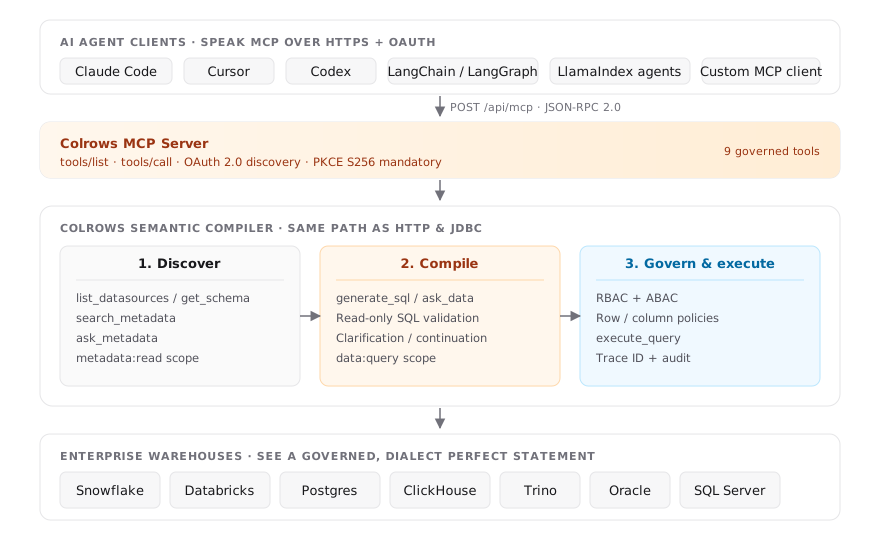
Two ways in, one connector
The Colrows MCP connector is a single endpoint. Who calls it, and how you set it up, differs by caller - but the tools, scopes, governance, and result envelope are identical either way.
ChatGPT, Claude, Cursor, Codex
Off-the-shelf assistants and IDEs that already speak MCP. A person connects Colrows once inside the app, approves access through the Colrows consent screen, and then asks questions in plain language.
- No code - add Colrows as a custom MCP connector.
- The app runs the OAuth flow and stores the tokens.
- Best for interactive, human-in-the-loop analytics.
Your own agents & frameworks
Agents built on LangChain, LlamaIndex, or a bespoke stack call the connector programmatically over JSON-RPC. They discover the tool catalog with tools/list and invoke tools with tools/call.
- Register once via dynamic client registration.
- Drive the OAuth authorization-code + PKCE flow yourself.
- Best for automated, unattended data workflows.
Why MCP, not a custom connector
Agent frameworks and AI apps keep multiplying, and every one of them wants its own connector to your data. MCP collapses that into a single contract: build one server, and ChatGPT, Claude, Cursor, Codex, and any custom agent can all reach it without a rewrite. Colrows implements that server so callers inherit compile-time governance automatically - a caller cannot query a table, column, or row it isn't authorized to see, because the unauthorized plan is never generated in the first place.
Agents and apps emit intent over MCP. Colrows compiles it into governed, dialect-perfect SQL. Fix the context, not the model.
Endpoint & protocol
POST https://cloud.colrows.com/api/mcp/mcp-clients
Content-Type: application/json
Authorization: Bearer <mcp-access-token>
Messages are JSON-RPC 2.0 over HTTPS POST. There is no long-lived MCP session - each request is self-contained, which keeps the connector stateless and horizontally scalable. Clients that only speak Server-Sent Events receive the same JSON-RPC response framed as a single SSE message event.
- Supported protocol versions:
2025-06-18(latest),2025-03-26,2024-11-05. Send the negotiated version in theMCP-Protocol-Versionheader afterinitialize. - Supported methods:
initialize,ping,tools/list,tools/call- all dispatched through the one endpoint above. GETandDELETEon the endpoint return405 Method Not Allowed. Notifications return202 Acceptedwith no body.- Server identity:
serverInfo.nameiscolrows,serverInfo.versionis2.0.0. Tool-list changes are not pushed (tools.listChanged: false).
Authentication
MCP uses OAuth 2.0; the full flow is below. For how every Colrows surface authenticates - REST, embedding, and MCP - see the Authentication reference.
Every caller authenticates with OAuth 2.0. An unauthenticated request returns 401 Unauthorized with a WWW-Authenticate header pointing to protected-resource metadata - discover endpoints from there rather than constructing OAuth URLs by hand.
/.well-known/oauth-protected-resource/api/mcp/mcp-clients
/.well-known/oauth-authorization-server/api/oauth
The authorization server (issuer /api/oauth) advertises these endpoints:
| Endpoint | Path |
|---|---|
| Authorization | /oauth/authorize |
| Token | /api/oauth/token |
| Dynamic client registration | /api/oauth/register |
| Revocation | /api/oauth/revoke |
- Public OAuth clients - no client secret (
token_endpoint_auth_methods_supported: none). Dynamic client registration is supported. - Authorization-code grant with PKCE S256 mandatory; refresh-token grant supported.
- Access tokens (
cr_mcp_at_…) expire after 15 minutes. Refresh tokens (cr_mcp_rt_…) expire after 30 days and rotate on use. Authorization codes expire after 5 minutes. - HTTPS redirect URIs; HTTP is allowed only for loopback hosts (local dev clients). Cursor's native callback
cursor://anysphere.cursor-mcp/oauth/callbackis explicitly allowed. - The user authenticates through the normal Colrows browser login and explicitly approves access.
Scopes
| Scope | Permission |
|---|---|
metadata:read | Read accessible datasource and semantic metadata. |
data:query | Answer analytics questions and run read-only queries. |
If no scope is requested during authorization, Colrows grants both scopes after user approval - the same RBAC/ABAC identity that governs the browser UI governs every MCP tool call.
Connect an MCP client app
For ChatGPT, Claude, and Cursor there is no code to write. Point the app at the connector URL and it runs the OAuth flow for you; you approve access on the Colrows consent screen.
- ChatGPT - add a custom MCP connector pointing at
https://cloud.colrows.com/api/mcp/mcp-clients. ChatGPT opens the Colrows consent page, and after you allow access the tools appear in the conversation. - Claude - add Colrows as a custom connector with the same URL, or from Claude Code:
claude mcp add --transport http colrows https://cloud.colrows.com/api/mcp/mcp-clients- Cursor - add the connector to your MCP config:
{
  "mcpServers": {
    "colrows": {
      "url": "https://cloud.colrows.com/api/mcp/mcp-clients"
    }
  }
}Colrows for Excel signs in through the same OAuth flow and calls the verified-query tools over the REST wrapper - a worked example of a first-party MCP client.
See and disconnect connected apps
Every app you approve on the consent screen keeps its access until it stops using it, you disconnect it, or an administrator revokes it. An app your organization registered also loses access when its registration expires, however often it uses its access. To see what can currently act for you, open Personal settings → Connected apps.
Each app you approved appears once, with:
- its name, and who registered it: Colrows application (such as the Excel add-in), Registered by your organization, or Connected by you for an app that registered itself, such as ChatGPT or Claude;
- what it can do as you, in the same words as the consent screen;
- when you connected it, and when its access ends: either when its sign-in lapses because the app stopped using it, or, for an app your organization registered, when the app's registration expires, whichever comes first. The page says which one applies.
Select Disconnect and confirm to end every approval you gave that app. Its access and refresh tokens stop working for you at once; other users of the same app are not affected. To use the app again, connect it and approve it again. Apps that an administrator revoked, or that expired, no longer appear, because their access has already ended.
The list and the disconnect action need your signed-in Colrows session: GET /api/oauth/connected-apps and DELETE /api/oauth/connected-apps/{clientId}. Each app in the list carries tokenExpiresAt (moves later while the app keeps using its access), appExpiresAt (the registration's fixed expiry, or 0 when there is none), and accessEndsAt, the earlier of the two. An app's own OAuth token is refused with 403, so one app cannot see or remove your other connections.
Initialize & discover tools
{
  "jsonrpc": "2.0",
  "id": 1,
  "method": "initialize",
  "params": {
    "protocolVersion": "2025-06-18",
    "capabilities": {},
    "clientInfo": { "name": "my-agent", "version": "1.0.0" }
  }
}
Discover the full tool catalog - names, input schemas, output schemas, and annotations - with tools/list. Every Colrows tool publishes readOnlyHint: true and destructiveHint: false; Colrows also enforces read-only behavior server-side, so the hint is a guarantee, not a suggestion.
Tool catalog
Six read-only tools, returned by tools/list. Metadata tools resolve against the exact entities and definitions curators manage in Catalog, and query tools compile through the same governed pipeline as the rest of Colrows.
listDatasources- list datasources accessible to the caller (metadata:read)askMetadata- answer a natural-language question about accessible metadata, relationships, and joins (metadata:read)askData- generate and run a read-only query from a question; SQL text is not accepted (data:query)searchVerifiedQueries- find valid, curator-approved queries for a question, with their parameter definitions (metadata:read)getVerifiedQuery- get the current version and parameter definitions of a verified query by ID (metadata:read)executeVerifiedQuery- run a verified query by ID and version, with values for its declared parameters (data:query)
The full per-tool schemas, the request and response envelope, error codes, and clarification & continuation are documented once in the MCP Tool Reference - and apply identically whether you call over JSON-RPC (here) or the REST wrapper.
No tool accepts SQL text. Use askData for an open-ended question, or searchVerifiedQueries then executeVerifiedQuery when you want a governed, curator-approved query run by ID and version. Pass values for the query's parameters in params; the saved SQL never changes.
Calling a tool
{
  "jsonrpc": "2.0",
  "id": 3,
  "method": "tools/call",
  "params": {
    "name": "askData",
    "arguments": {
      "datasourceId": "238b1c06-a155-4fc3-b229-2cc657500891",
      "schema": "public",
      "question": "Show net revenue by region for the previous month",
      "maxRows": 100
    }
  }
}
A tool call returns a governed result envelope (structuredContent.data plus a text copy), and the natural-language tools may first return a typed clarification with a continuation token you resume with the user's answer. The full envelope, the _meta error codes, and the clarification & continuation flow are documented in the MCP Tool Reference - the same token and endpoint are used either way.
Read-only & security guarantees
- MCP tools never create, edit, or delete user-facing Colrows resources - no dashboards, metrics, business terms, policies, users, or datasources can be mutated through this surface.
- No tool accepts SQL text; a request containing a
sqlfield is rejected.askDataandexecuteVerifiedQueryonly ever runSELECTstatements Colrows itself produced or a curator approved. - Every executed query passes through the same ACL, row-level security, and redaction paths as the Colrows UI and API.
- MCP telemetry never logs OAuth tokens, authorization codes, PKCE verifiers, natural-language questions, generated SQL, or query result rows.
Building agents on Colrows
- Discover available datasources with
listDatasources, then use a returneddatasourceId- don't invent IDs, schema, table, or column names. - Use
askMetadatafor questions about the semantic layer, relationships, or governance; use its answer or surface its clarification to the user. - Use
askDatawhen the user wants query results from an open-ended question. - Use
searchVerifiedQueriesthenexecuteVerifiedQuerywhen a governed, curator-approved query is the right answer. Supply each declared parameter inparams, using the name and type from the search result. If you getVERSION_CHANGED, callgetVerifiedQueryfor the current version and its parameters, then run it again. - Treat
truncated: trueon any result as an incomplete row transfer - don't draw conclusions from a partial set. - Retry transient infrastructure failures with bounded backoff; do not retry validation or authorization errors without changing the request.
Error handling
| Condition | Response |
|---|---|
| Missing, invalid, or expired access token | 401 Unauthorized |
| Valid token without the required scope | 403 Forbidden with the required scope in WWW-Authenticate |
| Malformed JSON | JSON-RPC -32700 |
| Invalid request / unsupported protocol version | JSON-RPC -32600 |
| Unsupported MCP method | JSON-RPC -32601 |
Invalid tools/call parameters | JSON-RPC -32602 |
| Validation, authorization, or execution failure on a known tool | Tool result with isError: true and a _meta["colrows/errorCode"] |
Tool-level error codes are INVALID_INPUT, NOT_FOUND, ACCESS_DENIED, VERSION_CHANGED, and FAILED. Full details, request shapes, and examples for every tool are in the MCP Tool Reference.
See these connections in action
MCP is one door into the same governed compiler. Two reads pair with this page:
Ready to put a governed semantic layer behind your agent fleet?
Book a technical integration review →