Short answer: BI metrics mismatch across dashboards because the same metric name gets rebuilt in many tools with different definitions, sources, filters, time logic, aggregation grain and refresh cycles, and no one owns the definition. Revenue alone can mean booked, billed, collected or recognized. The fix is to define each metric once in a governed semantic layer, scope it explicitly, and back it with named metric owners and enforcement.
Why do BI metrics not match across dashboards?
BI metrics do not match across dashboards because every dashboard often becomes its own small analytics system. Each report may have its own data source, filter logic, date logic, calculation method, naming convention, and refresh schedule. Over time, the same metric name starts producing different numbers.
The problem is not always that someone made a mistake. Often, every team made a reasonable local decision. Sales defined revenue one way. Finance defined it another way. Product analytics used a different source. Operations added a filter. Leadership saw the mismatch only after the numbers reached a review meeting.
The dominant cause is fragmented business logic, not the BI tool. But that framing has limits. Power BI’s hybrid-refresh and visual-caching behaviors, DAX filter-context errors, and extract-refresh timing are documented tool-level causes too. The defensible claim is that most mismatch is organizational, not that it is never the tool.
Dashboards disagree when metric logic is copied into many tools instead of governed in one shared semantic layer — and when no one owns the definition.
Why metric mismatch happens
Most enterprises start with simple reporting. A few dashboards are built by analysts who understand the data well. As usage grows, more teams create their own reports. Then new tools arrive: Power BI, Tableau, Looker, Excel, notebooks, internal applications, and AI assistants. Each tool needs metric logic. If that logic is not centralized, it gets recreated again and again.
| Reason | What changes | Example |
|---|---|---|
| Different definitions | Teams use the same metric name but mean different things. | Revenue may mean booked, billed, collected, or recognized. |
| Different sources | Dashboards pull from different tables, marts, extracts, or spreadsheets. | Sales dashboard uses CRM pipeline; finance uses invoices. |
| Different filters | One dashboard excludes test accounts, refunds, or cancellations; another does not. | One report removes internal users; another includes them. |
| Different time logic | Dashboards use different calendars, cut-off times, or period boundaries. | One uses calendar month; another uses fiscal month. |
| Different aggregation | Dashboards summarize data at different grains. | Customer count differs: accounts vs. users vs. seats. |
| Different refresh cycles | Reports update at different times. | One dashboard refreshed this morning; another refreshed yesterday. |
| Different ownership | No single team owns the metric definition end to end. | Everyone uses “margin,” but no one owns the approved formula. |
Industry research confirms the problem is real. Gartner names “inconsistency in data across sources” as the single most challenging data quality problem enterprises face. dbt Labs’ 2026 State of Analytics Engineering Report (363 respondents) found that ambiguous data ownership remains a challenge for 41% of organizations, and concern about incorrect or hallucinated data reaching stakeholders rose from 66% to 83% in a single year — the steepest increase of any measured objective. Precisely’s 2025 Outlook found 67% of organizations do not fully trust their data. The prevalence of metric mismatch is not in doubt.
Real-world example: revenue mismatch in an enterprise review
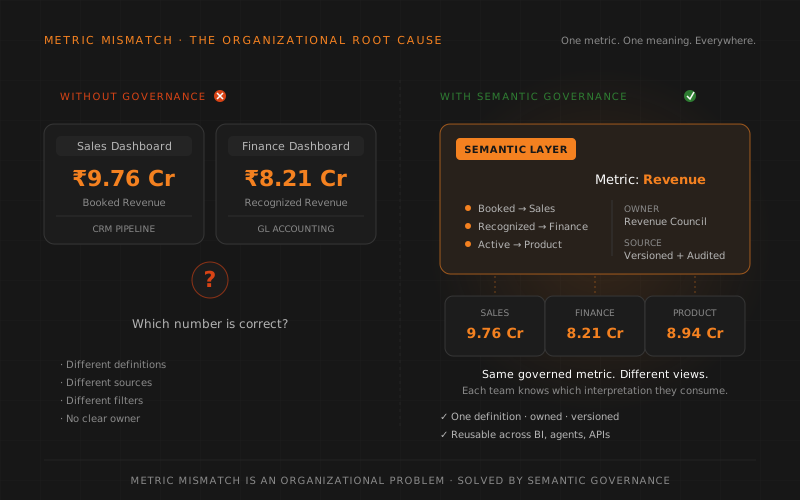
Imagine a monthly business review. The sales team presents a revenue dashboard showing ₹9.76 crore for the previous month. Finance presents another dashboard showing ₹8.21 crore. Product analytics shows a third number based on subscription activity. No one is intentionally wrong. Each dashboard is answering a slightly different question.
| Dashboard | What it counts | Why it differs |
|---|---|---|
| Sales dashboard | Booked order value | Includes deals booked this month, even if not invoiced yet. |
| Finance dashboard | Recognized invoice revenue | Includes only revenue recognized under finance rules. |
| Product dashboard | Active subscription revenue | Includes active product usage and subscription status logic. |
Under ASC 606 / IFRS 15, these are genuinely distinct concepts. Bookings represent contract value committed (and do not appear on financial statements). Billings represent invoiced amounts tied to cash flow. Recognized revenue is earned as performance obligations are satisfied — the only true GAAP “revenue” of the three. Collected is cash received. Revenue is a deliberately hard case to anchor on; most everyday metrics (DAU, churn, margin, customer count) diverge for simpler reasons. But revenue illustrates the principle precisely.
The meeting shifts from decision-making to reconciliation. Instead of discussing growth, margin, customer behavior, or risk, teams spend time asking: “Which number is correct?” The right answer is: all three are correct, for their respective questions. The wrong move is to pretend one is “the real revenue.”
The hidden causes behind dashboard mismatch
Some causes are obvious, such as using different tables. Others are subtle and much harder to detect.
1. Metric names hide business complexity
Names such as revenue, churn, active customer, NPA, margin, conversion, risk, or utilization sound simple. But each one may contain many business decisions. Which events count? Which records are excluded? Which time period applies? Which owner approves the rule? A two-syllable metric name can hide ten policy decisions.
2. Dashboard filters become invisible logic
Many dashboards contain hidden filters. One report may exclude cancelled orders. Another may remove test accounts. A third may apply a region filter by default. If those filters are not documented and governed, the dashboard output becomes difficult to compare.
3. Calculations are copied and modified
A metric often starts with one analyst’s calculation. Another team copies it, modifies it slightly, and uses it in a new report. Months later, both dashboards still use the same metric name but no longer use the same logic. This is the silent fork pattern, and it is everywhere.
4. Business rules change faster than dashboards
The business may change how it defines active users, revenue recognition, risk bands, collections, or customer status. If dashboards are not updated together, older definitions remain alive in production. The result: two dashboards using the “same” definition that diverged six months ago.
5. Tool-specific semantic models diverge
Some BI tools allow teams to define their own data models and calculations inside the tool. Power BI has DAX measures. Tableau has calculated fields. Looker has LookML. Each one can become a separate semantic island. dbt Labs’ Semantic Layer (MetricFlow), Cube, and Snowflake’s Horizon Context were all built to solve this exact fragmentation — though none of them eliminate it without organizational adoption.
6. Ownership is unclear
Many enterprises have dashboard owners but not metric owners. A dashboard owner maintains a report. A metric owner is responsible for the approved business definition. Without metric ownership, inconsistency grows quietly. dbt’s 2026 finding that 41% of organizations still cite ambiguous data ownership is a measurement of exactly this gap.
Why this matters for the business
Metric mismatch is not only a data team issue. It directly affects business trust, decision speed, governance, and AI readiness.
| Impact | What the business experiences |
|---|---|
| Lower trust | Leaders stop believing dashboards because numbers change depending on the source. |
| Slower decisions | Meetings shift from action to reconciliation and explanation. |
| Analyst overload | Data teams spend time defending numbers instead of producing new insights. |
| Operational confusion | Teams optimize for different versions of the same KPI. |
| Compliance risk | Regulated reports may use inconsistent definitions or outdated business rules. |
| Weak AI foundation | AI agents trained on or connected to inconsistent metrics will amplify wrong answers. |
Inconsistent BI metrics are especially dangerous when they become inputs for planning, forecasting, bonuses, compliance reporting, customer decisions, or AI-generated recommendations. Gartner research holds that poor data quality costs organizations $12.9 million a year on average; Forrester’s 2023 Data Culture survey found more than one-quarter of data professionals estimate losses above $5 million annually, with 7% citing $25 million or more. No clean “metric mismatch” dollar figure is published — but the cost is real and well-instrumented in adjacent measures.
How a semantic layer fixes metric mismatch (and what it does not)
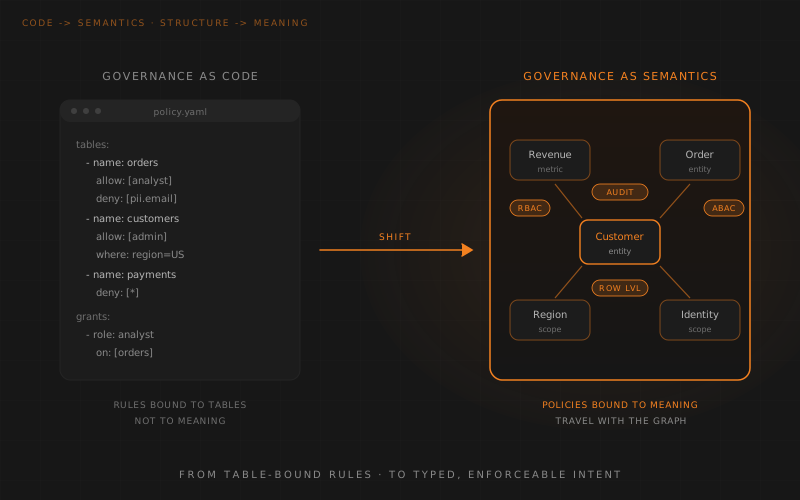
A semantic layer fixes the problem by moving business logic out of individual dashboards and into a shared governed layer. Dashboards, BI tools, applications, notebooks, and AI agents can then consume the same metric definitions. But every step below is a multi-week to multi-month organizational effort. Treat the five steps as a program, not a weekend project.
Step 1: Define every metric once
Each important metric gets a clear definition, formula, owner, source, grain, filters, and approval status. Revenue, churn, active customer, margin, and risk should not be redefined separately in every dashboard.
“Define once” is precise but incomplete. Revenue is exactly the case where a single global definition is impossible — finance and sales legitimately differ. Mature semantic layers handle this through scoped definitions: one canonical metric with multiple governed contexts (booked, billed, recognized) rather than pretending one is correct. The vagueness in “define once” is consequential, and the right answer is “define once, scope explicitly.”
Step 2: Attach business context
The semantic layer captures what the metric means, who owns it, which team approves changes, and how it differs from related metrics. This helps users choose the right metric for the right decision.
One caveat: a layer can store an owner attribute. It cannot, by itself, make humans accountable. “When to use it” is largely a governance and data-literacy process, not something the layer enforces. The technology stores; the organization enforces.
Step 3: Centralize filters and time logic
Default exclusions, fiscal calendars, region mappings, currency conversion rules, and status filters are governed in one place instead of hidden inside dashboard-level configuration. This is exactly what dbt MetricFlow, Cube, and LookML already centralize — not a novel gap, but a real and necessary one.
Step 4: Expose metrics to every tool
The same metric can be used by dashboards, APIs, notebooks, embedded analytics, and AI agents. The tool may change, but the business meaning remains the same.
This is harder than it reads. Tools differ in semantic models, grain handling, caching, and performance constraints. dbt’s own timeline is instructive: dbt Metrics (announced August 2022) was officially deprecated on December 15, 2023, after dbt acquired MetricFlow in February 2023. The MetricFlow-powered Semantic Layer reached GA only in October 2024. “Expose identical metric everywhere” is non-trivial even for the team that defined the category.
Step 5: Version and audit changes
When a definition changes, the semantic layer records what changed, who approved it, when it became active, and which reports or agents depend on it. Cube and Snowflake’s Semantic Studio offer Git-style versioning and impact analysis; Colrows offers point-in-time reproducible versioned graphs with downstream-impact tracking.
The capability exists. Accurate, complete dependency tracking across 100+ dependent metrics, every dashboard, and every agent degrades with scale and unmodeled consumers (spreadsheets, exported CSVs, ad-hoc SQL). Treat full lineage as a goal, not a solved problem.
Dashboards should not be the source of truth for metric logic. They should be consumers of governed metric definitions. But the layer is necessary, not sufficient — it must be paired with named owners, tie-breaking authority, and enforcement against local re-calculation.
Cost, timeline, and scale — the parts that are usually omitted
Most metric-governance narratives skip the hard parts. A few that matter:
- Inventory cost. Discovering every existing metric definition across dashboards, marts, and spreadsheets is a multi-month project at large enterprises. It is not glamorous.
- Tie-breaking authority. Who decides when finance and sales disagree on “revenue”? This is an organizational question with no technical answer. Whoever owns the metric must have the authority to overrule a department.
- Enforcement. “BI developers stop building local calculations” assumes an enforcement mechanism. Without API-only access, compile-time governance, or strict review, this is policy aspiration.
- Scale. At 10,000+ metrics, individual ownership requires hierarchy and dependency trees. A change to a foundational metric can propagate through dozens of dependents. The blog-friendly model of “every metric has an owner” degrades quickly at scale.
- Recovery. What happens when the semantic layer itself is wrong or stale? This is the “knowledge drift” problem, and it is operational reality even for governed layers.
The warehouse is no longer empty here
Historically, the line was: “A warehouse provides trusted storage but does not ensure shared definitions.” That line is increasingly dated. Snowflake’s Horizon Context and Semantic Views enforce metric definitions at query time across BI tools and agents (Snowflake markets this as having “eliminated metric discrepancies across teams”). Databricks’ Unity Catalog metric views do similarly. These are warehouse-native semantic solutions that already deliver much of the five-step program.
The remaining gap — and Colrows’ thesis — is cross-estate, agent-native, autonomous semantic governance that does not lock you to a single warehouse or BI tool. For a deeper treatment, see build vs. buy semantic layers and the semantic control plane.
The operating model: metric governance, not dashboard policing
Solving metric mismatch is not only a technology exercise. Enterprises also need a simple operating model for metric governance. This pattern is realistic at large enterprises; mid-market organizations may collapse several roles into one person.
| Role | Responsibility |
|---|---|
| Metric owner | Owns the business definition and approves changes. |
| Data owner | Owns the trusted source data and quality expectations. |
| Analytics engineer | Implements the metric in the semantic layer. |
| BI developer | Builds dashboards using approved metrics instead of local calculations. |
| Governance team | Ensures sensitive metrics, access rules, and audit requirements are followed. |
| Business user | Uses approved metrics and raises ambiguity when definitions are unclear. |
This model prevents the common situation where everyone uses a metric but no one owns it. The hard part is not the table; it is sustained executive sponsorship that gives metric owners actual authority to overrule departments.
Checklist: why your dashboards may not match
When two dashboards disagree, compare these items before blaming the BI tool:
- Are both dashboards using the same metric definition?
- Are they using the same source table or certified data product?
- Are the same filters applied?
- Are test, cancelled, duplicate, inactive, or internal records handled consistently?
- Are both using the same fiscal calendar or date boundary?
- Are currencies converted using the same rule?
- Are both dashboards refreshed at the same time?
- Are both aggregating at the same grain (account, user, seat)?
- Are joins and relationships defined consistently?
- Is there a named owner for the metric?
- Can you trace the metric definition version used by each dashboard?
If several of these are unclear, the issue is not the dashboard. It is missing metric governance.
Why this matters even more once AI agents arrive
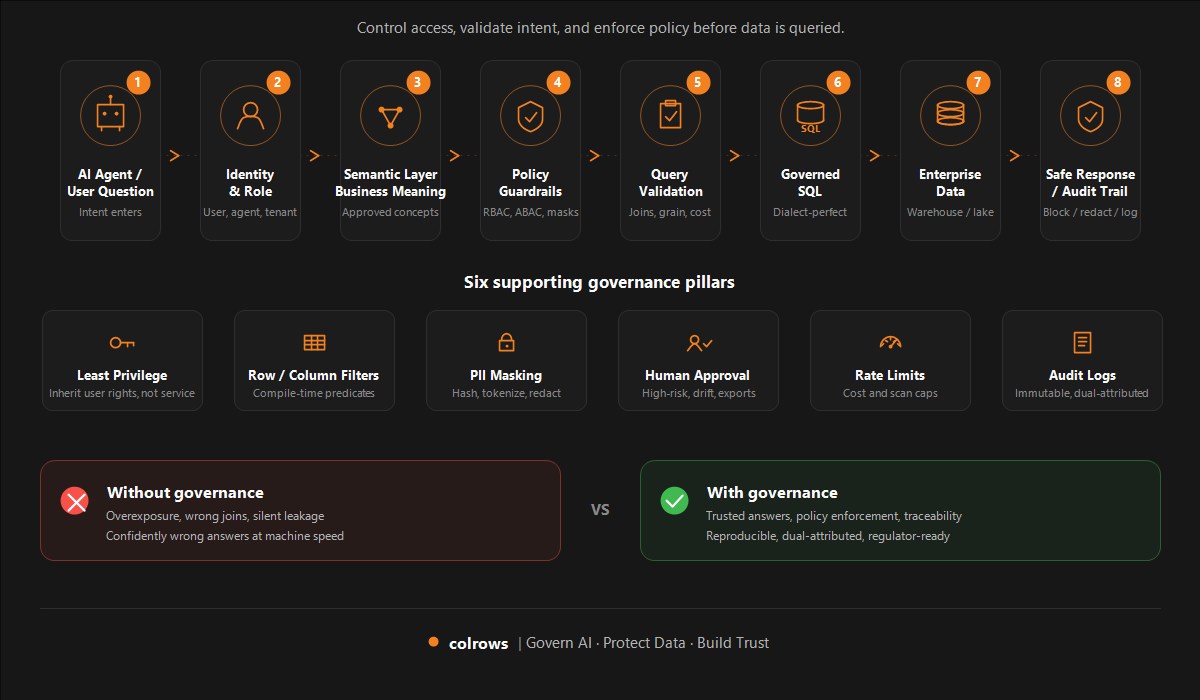
If dashboards already disagree, AI agents will not magically fix the inconsistency. They will often amplify it. dbt Labs’ 2026 report found 71% of organizations are concerned about hallucinated or incorrect data reaching stakeholders. An agent connected to inconsistent metrics will inherit that fragmentation, sometimes silently — producing confident, wrong answers at machine speed.
A semantic layer gives AI systems a governed source of metric truth before they generate answers. The governance layer must exist before agents depend on it, not as an afterthought to fix bad outputs. This is a related but separate concern from the BI-governance problem — do not conflate “dashboards disagree” with “agents need governance.” Both are true; they require different conversations. For a deeper treatment, see how to govern AI agents that query enterprise data.
How Colrows approaches metric consistency
Colrows is designed to help enterprises move business meaning out of scattered dashboards and into a governed semantic layer. The goal is to make metrics reusable, explainable, and consistent across BI tools, applications, and AI agents.
In Colrows, a metric is not only a calculation. It is a governed business object with definition, source, relationship logic, ownership, policy, and traceability. The semantic graph is versioned and typed; every change is recorded; every consumer (dashboard, agent, API) reads from the same compile-time-resolved definition. Autonomy and drift detection mean the layer maintains itself rather than becoming the next thing your data team has to keep alive manually.
Colrows is necessary infrastructure for fixing metric mismatch — but it does not replace the organizational discipline of naming owners, granting tie-breaking authority, and enforcing the contract. That work is yours; Colrows ensures the technology does not get in your way.
Closing thought
BI metric mismatch is one of the clearest signs that business logic has become scattered. The enterprise may have plenty of data, many dashboards, and modern BI tools, but still lack one shared layer of meaning.
The fix is not to manually reconcile dashboards every month. The fix is to govern the metric once and let every dashboard consume the same trusted definition. That requires both a semantic layer and organizational discipline. The layer is necessary but not sufficient. The hard work is in the organization — defining once, owning it, and enforcing it across every consumer.
Colrows builds the Autonomous Semantic Layer for enterprise AI.
Fix the Context. Not the Model.
Start the conversation: engage@colrows.com · colrows.com
Frequently asked questions
Why do two dashboards show different revenue numbers?
They may use different definitions, sources, filters, calendars, refresh times, or aggregation logic. Revenue is especially prone to mismatch because under ASC 606 / IFRS 15, booked, billed, collected, and recognized revenue are genuinely distinct business concepts. Each dashboard may be correctly answering a slightly different question.
Is metric mismatch a BI tool problem?
Usually no. BI tools can expose the problem and contribute through caching, refresh timing, and DAX context bugs, but the dominant cause is fragmented business logic across reports, models, extracts, and teams. The fix sits below the dashboard layer.
Can a semantic layer alone fix metric mismatch?
No. A semantic layer is necessary but not sufficient. It must be paired with organizational discipline: named metric owners, tie-breaking authority for definitional disputes, and enforcement mechanisms that stop teams from creating local calculations. Tools like dbt MetricFlow, Cube, LookML, and Snowflake Horizon Context provide the technical capability; organizations must provide the governance.
How does metric mismatch affect AI agents?
AI agents inherit the metric fragmentation present in the data layer. An agent connected to inconsistent metrics will produce confident, conflicting answers. The semantic layer must exist before agents depend on it, not as an afterthought to fix bad outputs.